
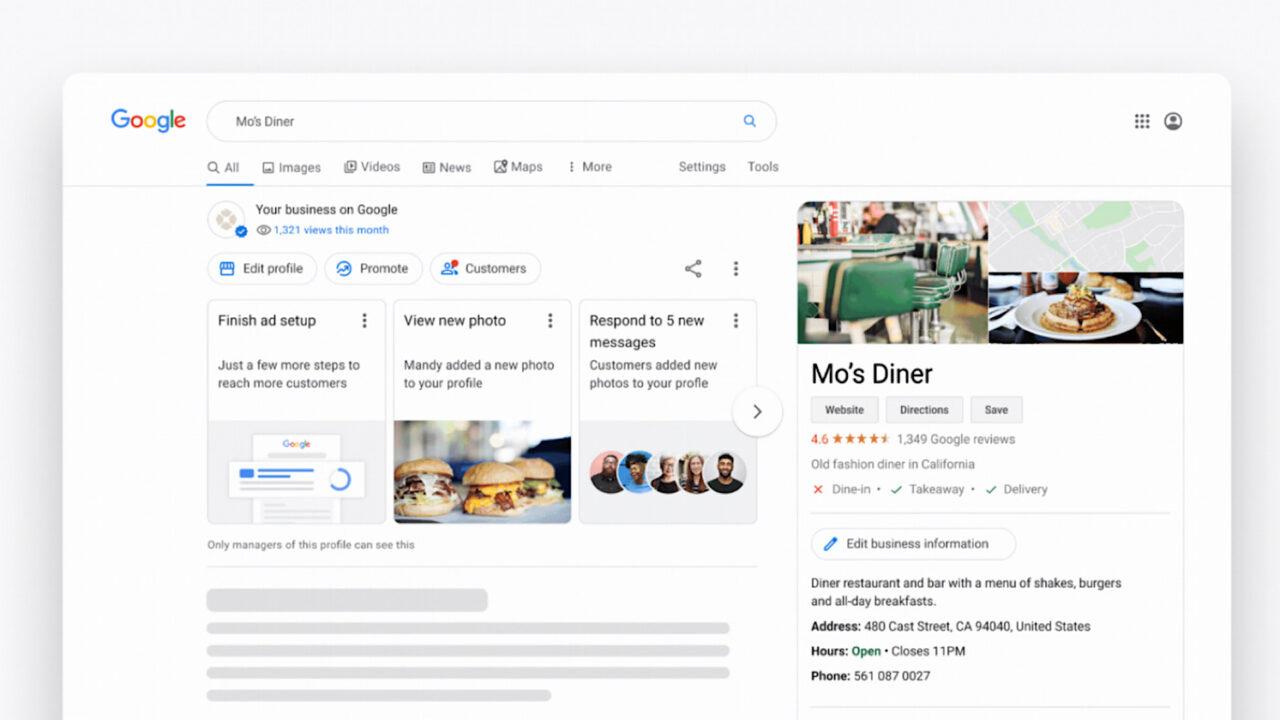

Your Google Business Profile is often the first thing families see when searching for home care. Not your website. Not your ads. That little box on the right side of Google with your hours, reviews, and photos.
Most home care agencies treat their GBP like a one-time setup task. Claim the listing, add a phone number, forget about it. That’s a mistake that costs you clients every single day.
In competitive markets, the agencies showing up in the local pack (those three map results at the top of Google) are getting 40% or more of all clicks. Everyone else splits the scraps.
This guide shows you how to optimize every element of your Google Business Profile so families find you first.
Why Google Business Profile Matters for Home Care
Let’s start with what’s actually at stake.
When someone searches “home care near me” or “in-home care [city name],” Google shows three things:
- Ads at the very top (paid placement)
- The Local Pack (3 map results with GBP listings)
- Organic results (traditional website rankings)
The local pack gets the lion’s share of clicks for location-based searches. And your position in that pack depends almost entirely on your Google Business Profile optimization.
Here’s what the data shows:
| Local Pack Position | Average Click-Through Rate |
|---|---|
| Position 1 | 24.4% |
| Position 2 | 12.7% |
| Position 3 | 9.3% |
| Not in pack | 2-5% combined |
If you’re not in the top three, you’re invisible to most searchers. Your local SEO strategy lives or dies based on GBP performance.
Setting Up Your Profile the Right Way
If you haven’t claimed your Google Business Profile yet, start at google.com/business. Google will verify you own the business, usually by sending a postcard to your physical address or through phone verification.
Once you’re verified, the real work begins.
Business Name
Use your exact legal business name. Don’t stuff keywords in here. “ABC Home Care” is correct. “ABC Home Care - Best Senior Care Services Near You” will get your listing suspended.
Google’s guidelines are clear on this, and they actively penalize keyword-stuffed business names. I’ve seen agencies lose their listings entirely for this violation.
Primary Category
This is the single most important field on your entire profile.
For home care agencies, your primary category should almost always be “Home Health Care Service”. This is the category that best matches the intent behind searches like “home care near me” and “in-home care services.”
Other options that might apply:
- Nursing Home (only if you operate a facility)
- Assisted Living Facility (only if you operate a facility)
- Home Care Agency (if available in your area)
- Elder Care Service
Choose the one that most accurately describes your core service. The primary category carries the most weight in Google’s ranking algorithm.
Secondary Categories
You can add up to 9 additional categories. Use them strategically:
- Caregiver
- Respite Care Service
- Senior Citizen Services
- Alzheimer’s Care
- Medical Office (if you provide skilled nursing)
Each additional category helps you show up for related searches. An agency with “Alzheimer’s Care” as a secondary category has a better chance of ranking for “dementia care near me” searches.
Service Area Configuration
Home care is a service-area business. You go to clients rather than clients coming to you. This changes how you configure your GBP.
Hiding Your Address
If your office isn’t open to walk-in clients (which is true for most home care agencies), you should hide your address. This tells Google you’re a service-area business and prevents the awkward situation of families showing up at your office unannounced.
In your GBP dashboard:
- Go to Info
- Click on your address
- Select “Clear address”
- Add your service areas instead
Defining Service Areas
You can add up to 20 service areas. Be strategic about this.
Do add:
- Cities where you actively provide care
- Neighborhoods within large metro areas
- Counties if you serve rural regions
Don’t add:
- Areas you’d drive to once in a blue moon
- Regions where you have no current clients
- Every possible city within a 100-mile radius
Google’s algorithm considers whether you can realistically serve an area. If you claim to serve 50 cities but all your reviews come from 3 of them, that inconsistency hurts your rankings.
The NAP Consistency Factor
NAP consistency means your Name, Address, and Phone number are identical everywhere online. Google cross-references your GBP with directory listings, your website, and social profiles.
If your GBP says “123 Main St, Suite 100” but your website says “123 Main Street #100,” that’s an inconsistency. These small differences confuse Google’s algorithm and can hurt your local rankings.
Audit your NAP across:
- Your website footer and contact page
- Local citations (Yelp, Yellow Pages, Care.com)
- Social media profiles
- State licensing databases
Optimizing Your Business Description
You get 750 characters to describe your business. Most agencies waste this space with generic fluff.
Here’s what actually works:
Lead with your primary service. “XYZ Home Care provides in-home care services for seniors in [City] and surrounding areas.”
Mention specific services. “Our caregivers assist with personal care, medication reminders, meal preparation, light housekeeping, and companionship.”
Include geographic keywords naturally. Reference the cities and neighborhoods you serve.
Add credibility markers. State licensing, years in business, any notable partnerships with hospitals or physicians.
Skip the superlatives. “Best home care in the city” means nothing. Families want facts, not claims.
Here’s an example that hits all the points:
“Sunrise Home Care has provided in-home care services to families in Austin, Round Rock, and Cedar Park since 2015. Our Texas-licensed caregivers help seniors maintain their independence with personal care assistance, medication management, meal preparation, and transportation to appointments. We specialize in Alzheimer’s and dementia care, with caregivers trained in memory care techniques. Family-owned and operated, we’re committed to matching each client with a caregiver who fits their needs and personality.”
Notice how it’s specific, mentions locations naturally, and focuses on what matters to families.
Photos and Visual Content
Businesses with photos get 42% more requests for directions and 35% more website clicks. Yet most home care agencies have maybe 3 photos uploaded, usually their logo and a stock image of a smiling nurse.
Photos You Should Add
Office exterior and signage. Shows you’re a real, established business.
Team photos. Introduce your caregivers and office staff. Families want to see real people.
Caregivers with clients (with permission). Nothing builds trust like seeing genuine interactions.
Your vehicles if branded. Shows professionalism and reach.
Community involvement. Photos from local events, health fairs, or charity work.
Photo Specifications
- Minimum 720px wide
- JPG or PNG format
- Under 5MB file size
- Well-lit, in focus, no heavy filters
Add new photos monthly. Fresh visual content signals to Google that your business is active and engaged.
The Review Strategy
Reviews are the third major ranking factor for local pack placement (after proximity and GBP completeness). They’re also the primary trust signal for families comparing agencies.
How Many Reviews Do You Need?
Look at the top 3 agencies in your local pack. If they have 50+ reviews, you need to be in that range to compete. If the leader has 20 reviews, reaching 25 gives you an advantage.
There’s no magic number, but more is generally better, assuming the reviews are legitimate.
Getting More Reviews
Ask at the right moment. The best time to request a review is after a positive interaction. When a family member thanks you for your care, that’s your opening.
Make it easy. Create a direct link to your review page. In GBP, go to Home > Share review form. Send this link via text or email.
Follow up systematically. Build review requests into your process. 30 days after service starts, check in with the family and ask if they’d share their experience.
Train your team. Caregivers who build strong relationships with families are your best source of reviews. Give them permission and scripts to ask.
Responding to Reviews
Respond to every review, positive or negative. This shows families you’re engaged and care about feedback.
For positive reviews: Thank them specifically, reference something from their review, reinforce your commitment.
For negative reviews: Respond professionally, apologize for their experience, offer to discuss offline. Never get defensive or argue publicly.
Review management isn’t just about damage control. Thoughtful responses show potential clients how you handle feedback and problems.
Google Posts: The Underused Feature
Google Posts let you publish updates directly to your Business Profile. They appear in your listing and can influence rankings. Most agencies ignore this feature entirely.
Types of Posts
What’s New: General updates, announcements, behind-the-scenes content.
Events: Upcoming community events, caregiver training sessions, family seminars.
Offers: Promotions like free consultations or caregiver matching guarantees.
Post Best Practices
- Publish at least once per week
- Include a high-quality image (1200x900 pixels works best)
- Add a call-to-action button (Learn More, Call Now, Book)
- Keep text under 300 words
- Use keywords naturally
Posts expire after 7 days, so consistency matters. A content calendar helps you maintain a regular publishing schedule.
Post Ideas for Home Care Agencies
| Post Type | Example Topic |
|---|---|
| What’s New | ”Meet our newest caregiver, Maria, who brings 10 years of dementia care experience” |
| Event | ”Free family caregiver workshop this Saturday at Austin Public Library” |
| Offer | ”Schedule a free in-home care assessment this month” |
| What’s New | ”Tips for keeping seniors safe during summer heat” |
| What’s New | ”We’re proud to announce our partnership with Austin Regional Hospital” |
Tracking Your Performance
Google provides analytics inside your GBP dashboard. Check these metrics monthly:
Search queries: What terms are people using to find you? This informs your SEO strategy.
Direction requests: How many people are asking for directions to your office or service area?
Phone calls: Track when calls happen and which listings drive them.
Website clicks: Are people moving from your GBP to your website?
If you see declining metrics, revisit your optimization. If queries are growing but calls aren’t, your profile might be missing key information families need.
Common Mistakes to Avoid
Inconsistent business hours. If your GBP says you’re open 24/7 but your website says 8am-6pm, that’s a red flag.
Ignoring Q&A. Users can ask questions on your profile. Monitor and answer these quickly before competitors or random strangers answer for you.
Keyword stuffing in the business name. Mentioned earlier but worth repeating. This will get you suspended.
Fake reviews. Google’s algorithm is sophisticated enough to detect review fraud. The penalties aren’t worth the risk.
Set and forget mentality. GBP optimization is ongoing. The agencies dominating local search are updating their profiles regularly.
Frequently Asked Questions
How long does it take to rank in the local pack?
There’s no guaranteed timeline. Some agencies see improvement within weeks of optimization. Others in competitive markets take 3-6 months. Consistency and ongoing optimization matter more than any single fix.
Should I have separate GBP listings for multiple locations?
Yes. Each physical location with its own address should have its own Google Business Profile. Don’t try to combine locations into one listing.
Can I manage GBP for a home care franchise?
Franchise locations should each have their own GBP with unique content and local photos. Google does allow multi-location management through tools like Google Business Profile Manager.
What if I get a fake negative review?
Flag the review through your GBP dashboard. Google will investigate and remove reviews that violate their policies. In the meantime, respond professionally to show other readers your side.
Do Google Ads affect my local pack ranking?
No. Paid ads and organic local rankings are separate. Spending on Google Ads won’t improve your local pack position, but ads can appear above the local pack for additional visibility.
Next Steps
Your Google Business Profile is the foundation of your local SEO strategy. Without a fully optimized profile, every other marketing effort works harder than it should.
Start with our free GBP checklist to identify gaps in your current optimization. Then work through each section of this guide systematically.
If you want expert help getting your profile (and overall local presence) performing at its best, contact us for a free audit. We specialize in local SEO for home care agencies and know exactly what moves the needle.
Local visibility isn’t optional. It’s where families start their search.